
All work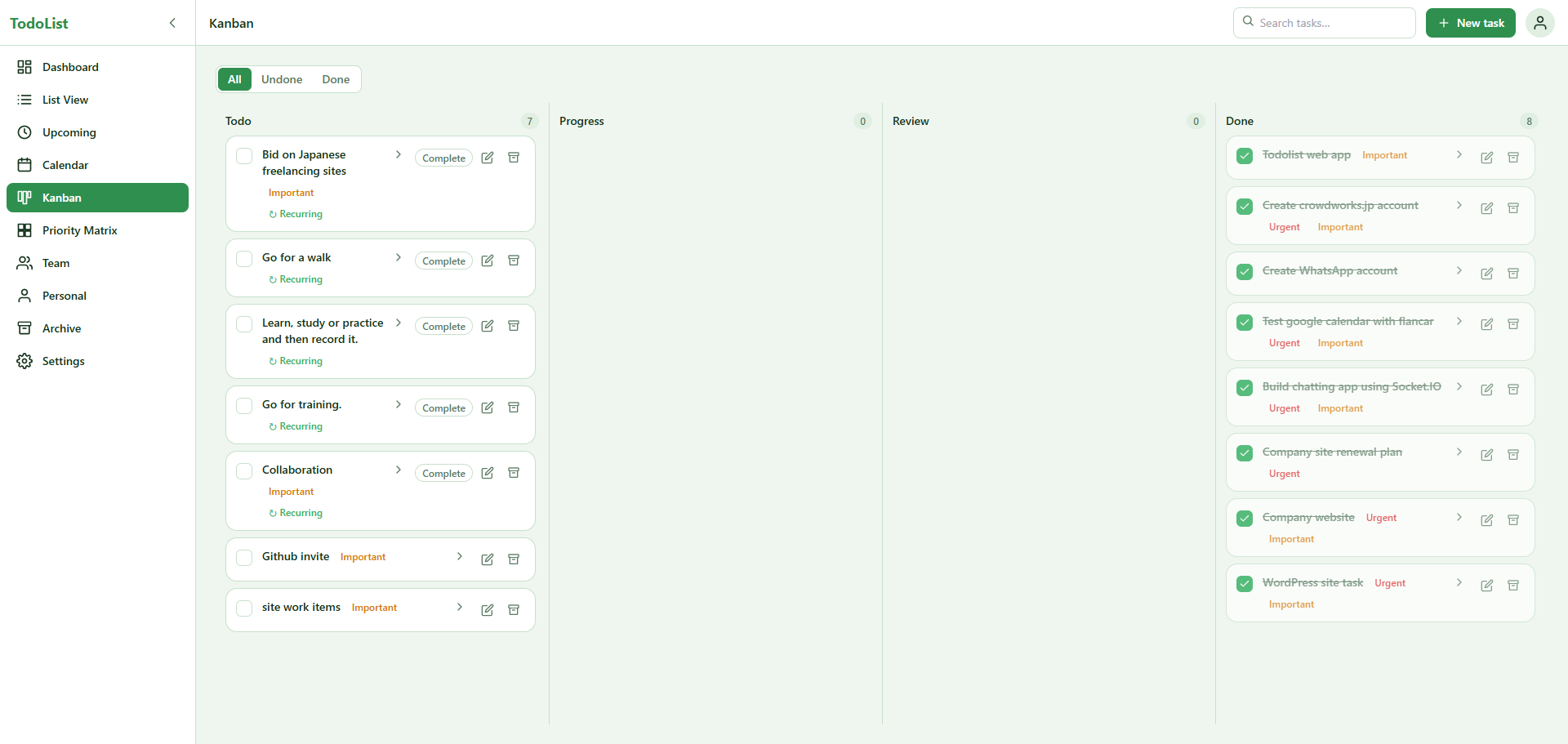
 Next.js
 React
React TypeScript
 TailwindCSS
 Supabase
 Vercel
TeamSync — Collaborative Task & Project Management Platform
Web Developmentfor LedgerKit
TeamSync is a real-time task and project management platform for individuals and teams, built with Next.js 16, React 19, TypeScript, and Supabase. It unifies personal and team work in one privacy-respecting workspace, offering seven ways to view the same tasks — dashboard, list, calendar, Kanban, priority matrix, upcoming planner, and archive — all powered by drag-and-drop interactions and live multi-user synchronization. With recurring tasks, timezone-aware scheduling, browser notifications, nine themes, and database-level Row Level Security, TeamSync scales seamlessly from a single user's to-do list to a full team coordinating complex, time-sensitive work in real time.
TeamSync is a full-featured, real-time task and project management platform built for both individuals and teams who need a single workspace to plan, assign, and track their work. Where most to-do applications stop at a flat checklist, TeamSync brings together seven distinct ways of looking at the same set of tasks — a dashboard, a list view, a calendar, a Kanban board, a priority matrix, an upcoming planner, and an archive — so that every user can manage their work in whatever way suits the moment. The platform was designed and delivered end-to-end by our team, from the database architecture through to a polished, fully themeable interface.
The application is built on a modern, server-first Next.js 16 architecture using the App Router, React 19, and TypeScript throughout. Data is persisted in a Supabase PostgreSQL backend, while Supabase Realtime powers instant synchronization across every connected team member. The result is a responsive, collaborative product in which a change made by one person — moving a task, reassigning it, or marking it done — is reflected on everyone else's screen within moments, with no page refresh required.
Our client needed a productivity tool that could serve two audiences at once: individuals managing their personal lives, and teams coordinating shared work. The two have very different requirements. Personal tasks must remain completely private to their owner, whereas team tasks must be visible to every member of the team, assignable to specific people, and synchronized live as work progresses. On top of this, the client wanted recurring tasks, timezone-aware scheduling, birthday reminders, a deletion safety net, and a flexible theming system, all delivered in a clean and fast interface. The core engineering challenge was unifying these two worlds into one coherent data model and permission system without compromising either privacy or performance. We solved this by designing a shared schema in which lists and tasks each carry a type of either personal or team, with database-level Row Level Security guaranteeing that personal data can only ever be read by its owner while team data is scoped strictly to verified team members. Because security is enforced at the database layer rather than only in the application, an entire class of access-control bugs is eliminated by design.
TeamSync uses a deliberately lightweight, privacy-respecting authentication model in which users sign up with a username and password and no email address is required. Each profile stores a username, a birthday, a preferred theme, and a timezone. Passwords are hashed with bcrypt, and the platform supports the full account lifecycle of registration, login, logout, profile editing, and password reset. When an administrator resets a password, the account is flagged so that the user is required to set a new password on their next login, which keeps the recovery flow simple while still protecting the account.
Any user can create a team, and the creator automatically becomes its administrator and owner. Administrators hold a clear set of privileges: they can add members directly by username, remove members, reassign tasks between team members, and manage the team's lifecycle through archiving and deletion. Regular members can see all of their team's lists and tasks and collaborate freely, but they receive notifications only for the tasks assigned specifically to them, which keeps their attention focused and their notification stream relevant. This permission structure is mirrored precisely in the database's Row Level Security policies, so that administrative actions such as removing members or archiving a team are gated to the team admin alone, while ordinary read and write access to team content is granted to any confirmed member. The application's interface and the database's security rules are therefore two expressions of the same underlying permission model, which makes the system both easy to reason about and difficult to misuse.
A defining feature of TeamSync is that the same underlying tasks can be viewed and manipulated through seven different lenses, each with its own interaction model. The Dashboard acts as an at-a-glance command center surfacing today's work, overdue items, upcoming deadlines, tasks assigned to the current user, team tasks, birthdays, and everything completed during the week. The List View offers the classic layout, placing team lists and personal lists side by side with the tasks inside each list automatically sorted by time, then urgency, then importance. The Upcoming view is a forward-looking planner that can be filtered by day, week, or month. The Calendar presents day, week, and month views in which dragging a task to a new slot updates its date, time, and timezone instantly. The Kanban board organizes work into Todo, Progress, Review, and Done columns, with a card's status changing as it is dragged between them. The Priority Matrix arranges tasks in a two-by-two Eisenhower grid spanning urgent-and-important, urgent-only, important-only, and normal, updating a task's urgency and importance flags as it is moved between quadrants. Finally, the Archive serves as the staging area for the platform's two-step deletion safety net. Every view supports filtering by all, undone, or done, and the major views support day, week, and month ranges wherever that is useful.
Drag-and-drop is not a cosmetic flourish in TeamSync but the primary means of changing real data. Built on dnd-kit, the interface lets users reorder lists, move tasks between lists, shift them across Kanban columns, drag them to a new calendar slot, reassign them to a teammate, or move them between priority quadrants. Each drag triggers an optimistic update so that the interface responds instantly, with an automatic rollback if the server rejects the change.
Tasks in TeamSync are considerably richer than a simple title and checkbox, carrying a description, scheduling fields for date, time, due date, and timezone, a workflow status, urgency and importance flags, and notification preferences. The platform handles recurring tasks with particular care. A one-off task shows a single Done checkbox, whereas a recurring task shows both a "Done today" checkbox and a separate "Complete" action. This lets a user mark today's instance complete, after which it remains in rotation with a "Completed today" badge, while reserving the Complete action for finishing the recurring task permanently. Recurrence is modeled through a dedicated occurrences table so that each individual instance of a repeating task can be tracked, completed, and reported on independently. Timezone handling received deliberate design focus as well, with team tasks stored internally in a consistent reference timezone and personal tasks using the user's own local zone, while the interface always presents times in the viewer's local timezone so that a distributed team never has to perform mental timezone math.
Supabase Realtime sits at the heart of the collaborative experience, with live subscriptions enabled on tasks, lists, teams, members, and task occurrences. When one user edits a team task, the change is written to PostgreSQL, a realtime event fires, and every other team member's interface updates immediately. Combined with the optimistic UI strategy, this produces an experience that feels instantaneous to the person making the change and live to everyone watching it.
The platform also schedules local browser notifications to alert assigned users ten minutes before a task is due, recalculating its timers as realtime updates arrive. It brings a human touch through birthday notifications as well, presenting a full-width banner announcing today's and tomorrow's team birthdays alongside a one-time celebratory modal on the user's own birthday, with a tracking table ensuring that the modal is never shown twice. The interface ships with nine themes — light, dark, green, pink, yellow, purple, blue, red, and brown — each stored per user so that the workspace always opens the way they like it. Every team, list, and task is protected by a two-step deletion model in which items are first archived and only permanently removed from the dedicated Archive page, giving users a reliable safety net against accidental data loss. A comprehensive search spans task titles, descriptions, list and team names, usernames, statuses, and priority flags, while an activity log records every meaningful change for full team accountability.
The result is a production-grade productivity platform that scales gracefully from a single user managing personal errands to a full team coordinating complex, recurring, and time-sensitive work, all in real time and with privacy and data safety enforced at the deepest level of the stack. The project showcases our team's strength across the full modern web stack, spanning database design and security, real-time systems, complex interactive interfaces, and thoughtful product design.
Technologies used
Next.jsReactTypeScriptTailwindCSSSupabaseVercelLet’s build together
Want a result like this?
Tell us about your product and we will map a plan together.
Start a project